You may have seen this kind of scene before: a corridor light with a human-sensing radar has been installed, but the light turns on even when nobody is passing by. After checking the site, the real cause turns out to be the newly replaced router nearby.
This is not a mysterious event. It is the "co-frequency problem" of wireless signals.
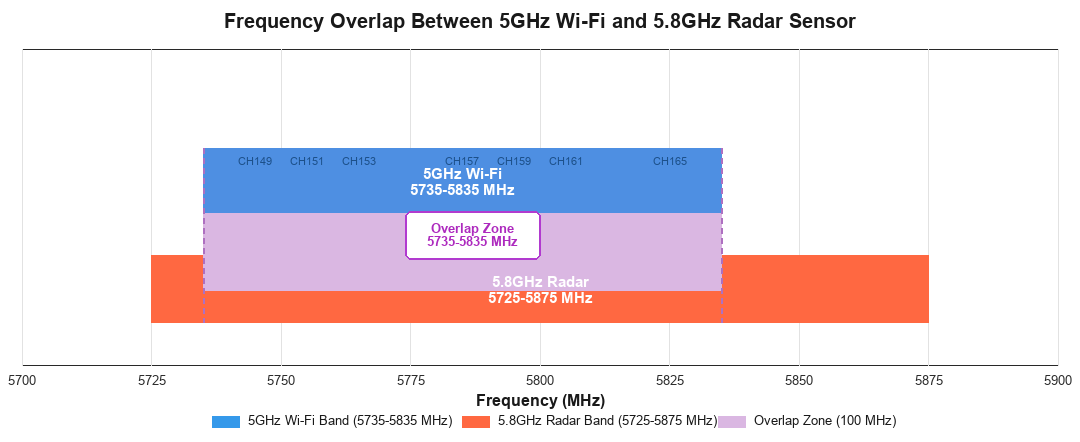
In China, the 5GHz Wi-Fi band commonly works from 5735MHz to 5835MHz, corresponding to channels 149, 153, 157, 161, and 165. Many common routers, including Huawei, Xiaomi, and TP-Link models, use this range for 5GHz Wi-Fi.
The operating band of a 5.8GHz radar sensor is usually 5725MHz to 5875MHz. Taking EasyDetek products as an example, the nominal operating band is 5800MHz +/- 75MHz.
When the two sets of numbers are placed together, the issue becomes clear: the 100MHz Wi-Fi bandwidth almost entirely falls inside the radar frequency band.
 5.8GHz radar sensor" />
What does frequency overlap mean? Two signals are "talking" in the same frequency range, and each one becomes noise to the other. The electromagnetic wave transmitted by the radar may be received by the router, while the higher-power Wi-Fi signal may also cause the radar to misjudge the signal. What is actually signal interference may be interpreted by the sensor as someone passing by.
From the perspective of electromagnetic compatibility, visible interference between two signal sources requires two conditions at the same time.
First, the frequencies are the same or close.
One signal can couple into the receiving path of the other. If the frequency difference between two devices is large enough, they can be placed together without affecting each other.
Second, the signal strength is sufficient.
Whether it is radar transmit power or Wi-Fi signal strength, if the coupled energy at the other receiver is below its sensitivity threshold, no actual effect will occur.
Looking at it in reverse, to remove interference, at least one of these two conditions needs to be broken:
The theory is simple. But in real installations, users usually will not change router channel settings just to install one sensor. The product itself needs to handle this issue.
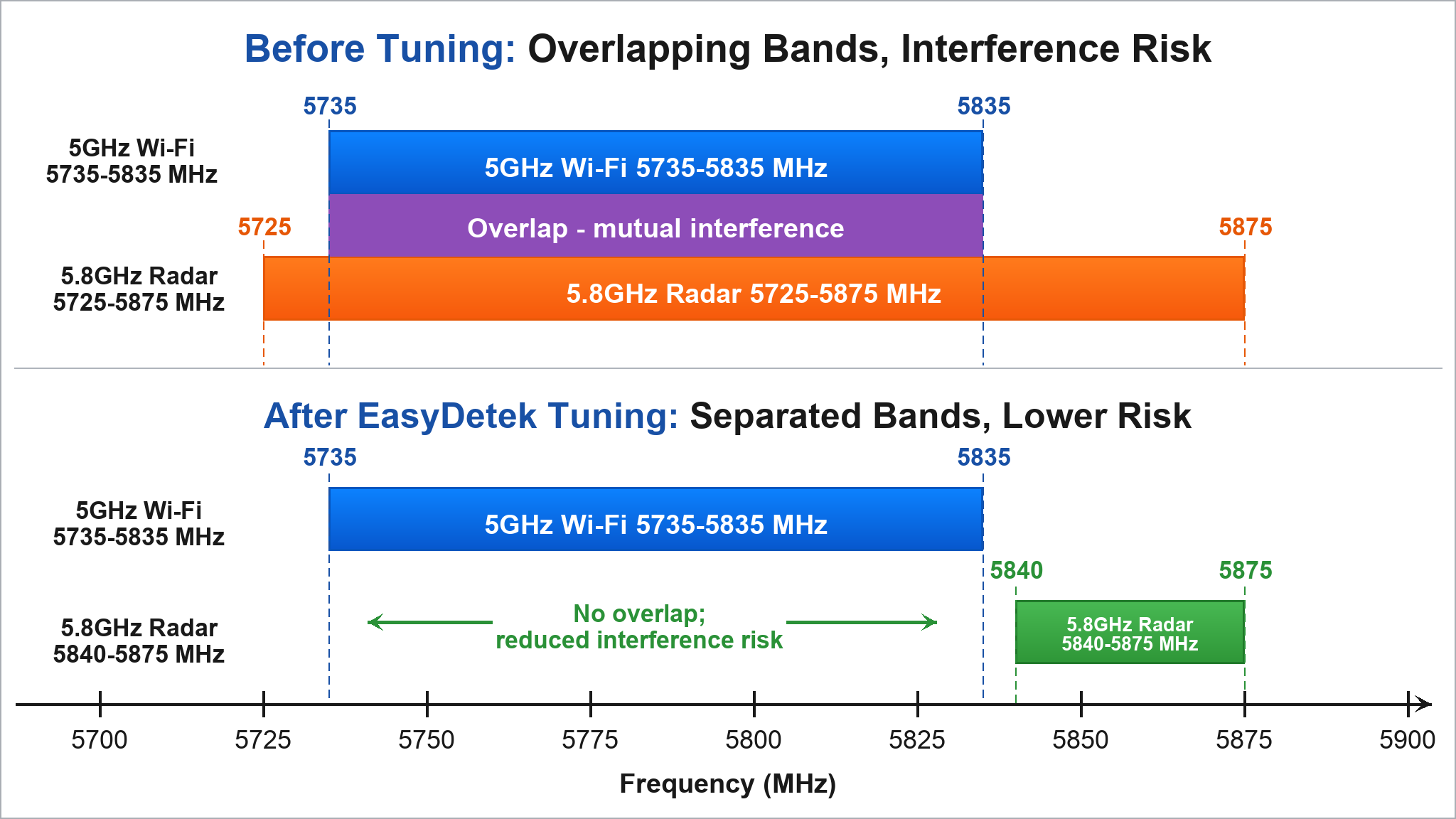
EasyDetek's approach is direct: adjust the operating band of the 5.8GHz radar precisely to 5840MHz to 5875MHz.
This range is separated from the 5735-5835MHz Wi-Fi band, with no overlap. After tuning, the radar works only within 5840-5875MHz, and none of the Wi-Fi channels falls into this interval. The two signals can work in separate ranges.
A technical solution should not rely only on verbal claims. EasyDetek has a standardized test process for this anti-interference design, and it is now part of the routine factory test items for products.
The test process is as follows:
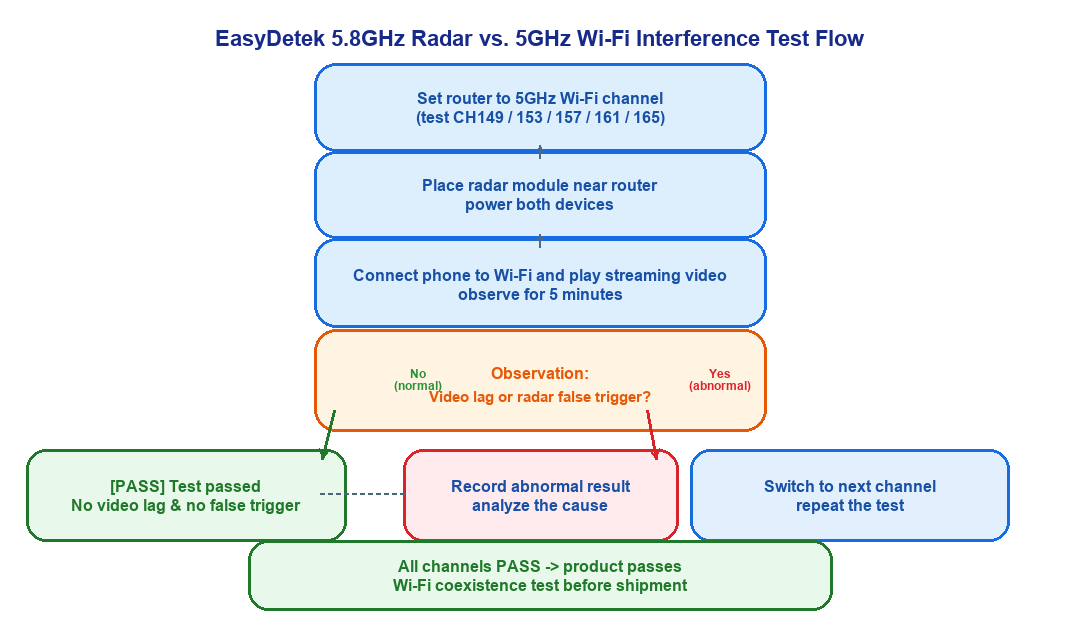
The pass criterion is simple: within 5 minutes, if the video does not freeze and the radar indicator does not flash by mistake, the channel test is passed. Then the next channel is tested. Only when all channels pass is the product judged qualified for anti-interference performance.
This test method looks simple, but its strength is that it is direct and repeatable. What the customer sees is close to the real usage scenario. After a large number of product tests, the results all passed, proving the effectiveness of frequency tuning technology.
The technical method solves the core problem, but in engineering practice we still recommend adding a second layer of physical protection: when installing a radar sensor, keep it away from routers and wireless APs as much as possible.
There is no need to separate them by dozens of meters. Even a physical distance of one or two meters is enough to let the air attenuate most of the coupled signal. Frequency separation plus distance separation gives double protection, making the probability of interference extremely low.
5.8GHz is one of the earliest frequency bands used at scale for human-sensing radar, and it is also the product line with the largest shipment volume today. As smart home devices become more common, the 2.4GHz band is already crowded, and the adoption of 5GHz Wi-Fi is still rising quickly. The issue of frequency coexistence will only become more important.
EasyDetek's attitude toward this issue is: do not avoid it, do not wait for users to ask, but solve it actively inside the product.
Frequency tuning, standardized testing, and continuous optimization: after these three steps, every sensor leaving the factory can face a router with confidence: you can keep using the internet, and I will not flash by mistake.
Return

Official Information Hotline: +852 8400 2558
Website: https://www.easydetek.com/en/Email: info@easydetek.com
Shenzhen EasyDetek Technology Co. Ltd ,
4th Floor, Building 3, Park A,
Xin'an COFCO Industrial Park, Bao'an District, Shenzhen