Yes, radar sensors can experience false triggers -- but this is a controllable deployment topic, not simply a product defect. Radar sensors work through reflected electromagnetic waves, so the right model, frequency band, parameter setting, and installation position all matter. EasyDetek helps customers evaluate the scenario before sampling, so testing can start with a more suitable solution.
If you are choosing a radar sensor for hotels, offices, smart homes, corridors, bathrooms, or other indoor spaces, you do not need to solve every technical variable alone. Start with three practical questions:
With this information, EasyDetek can recommend a more suitable radar model, frequency band, and tuning direction before sample testing.
Radar works by transmitting electromagnetic waves and analyzing reflections. Any object that reflects these waves can be 'seen' -- not just humans. Below are the 8 most common causes:
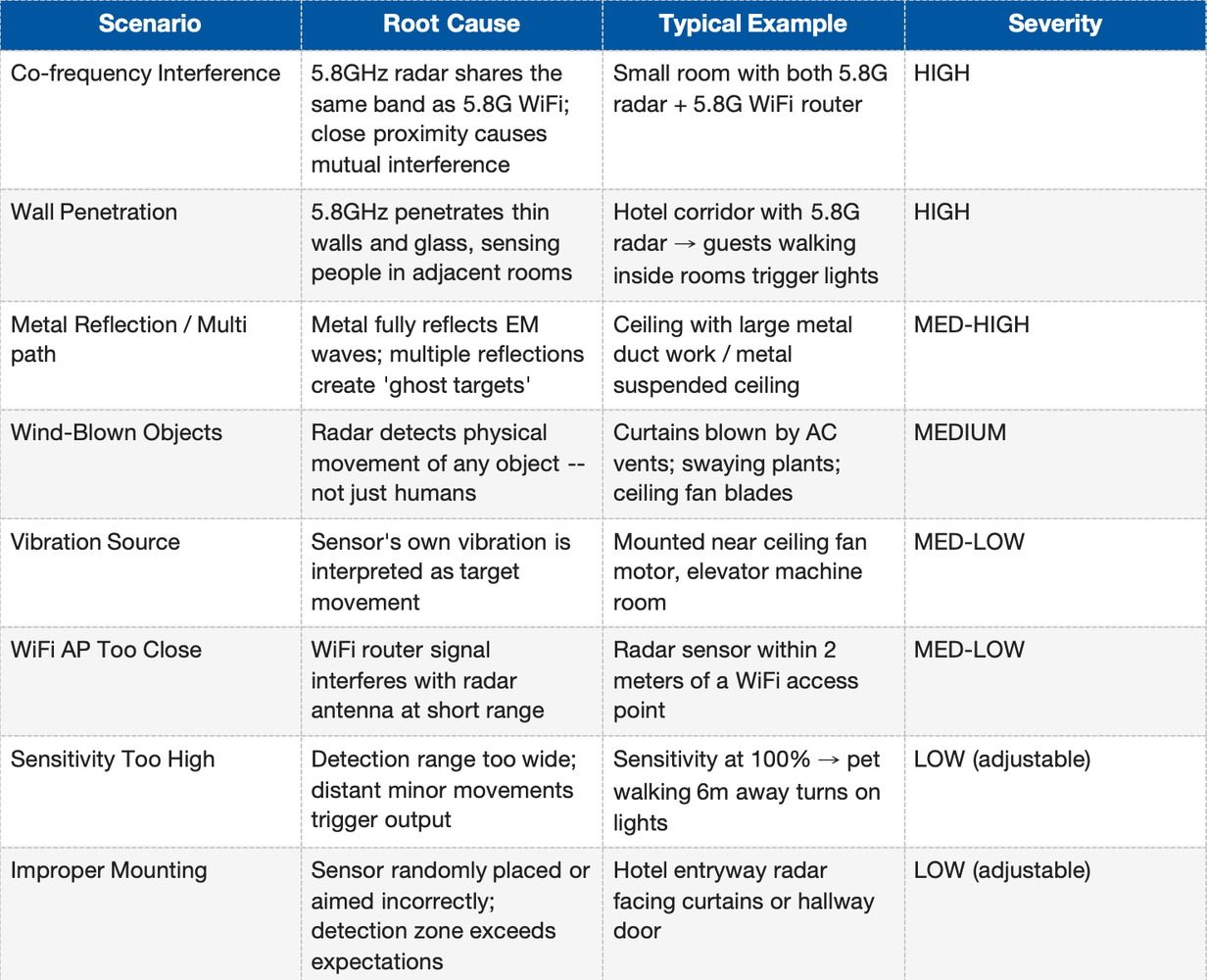
We address false triggers across five interconnected layers: frequency selection, dual-technology sensing, algorithm filtering, parameter adjustment, and installation best practices.
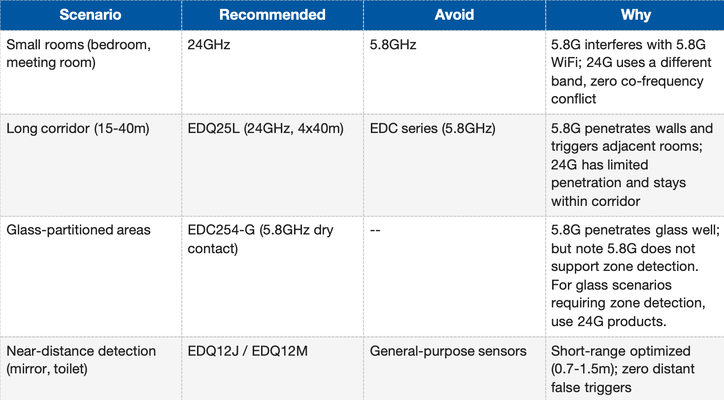
Selecting the correct frequency is the first line of defense. Higher frequency does not always mean better -- it depends entirely on the application.
Core Principle: Limited penetration is often an advantage. In corridor, hotel room, and partitioned indoor applications, 24GHz radar's lower wall penetration can help reduce unwanted triggers from adjacent rooms or corridors -- this is a useful design feature, not only a limitation.
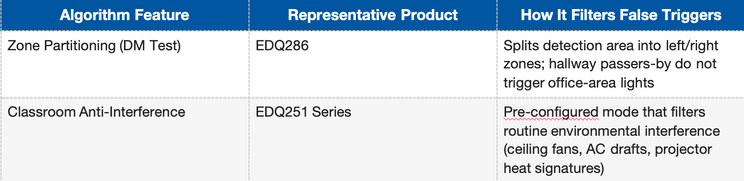
Beyond hardware, EasyDetek embeds intelligent algorithms in firmware to help filter false triggers at the software level, often without changing the customer's installation structure.
EasyDetek sensors support on-site parameter tuning. In many indoor projects, false-trigger feedback can be improved by adjusting sensitivity, detection range, delay time, or zone settings before considering hardware replacement. Here are the key tunable parameters by product line:
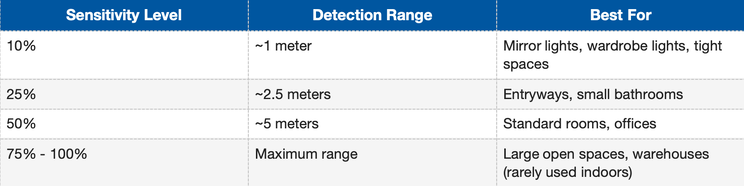
EDQ286 / EDC286 (Remote Control or BLE App):
Operation: Press DM Test on remote -> press stair-icon button to cycle sensitivity levels. Hold DM Test for 2 seconds to activate left/right zone partitioning.
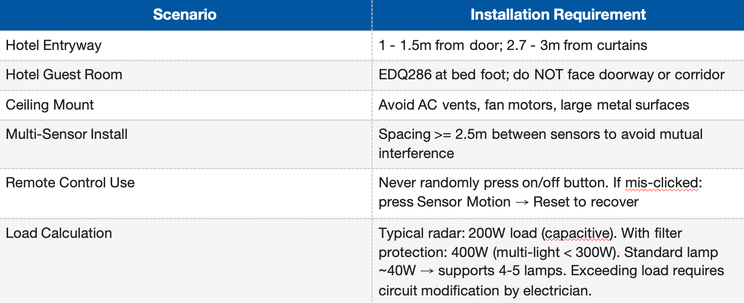
Proper installation is the final layer of false-trigger prevention. Before installing, ask the customer these three questions:
Step 1: Are there large metal surfaces in the environment?
Ceiling ducts, metal suspended ceilings -> Relocate sensor or reduce sensitivity. Metal causes multipath ghost targets.
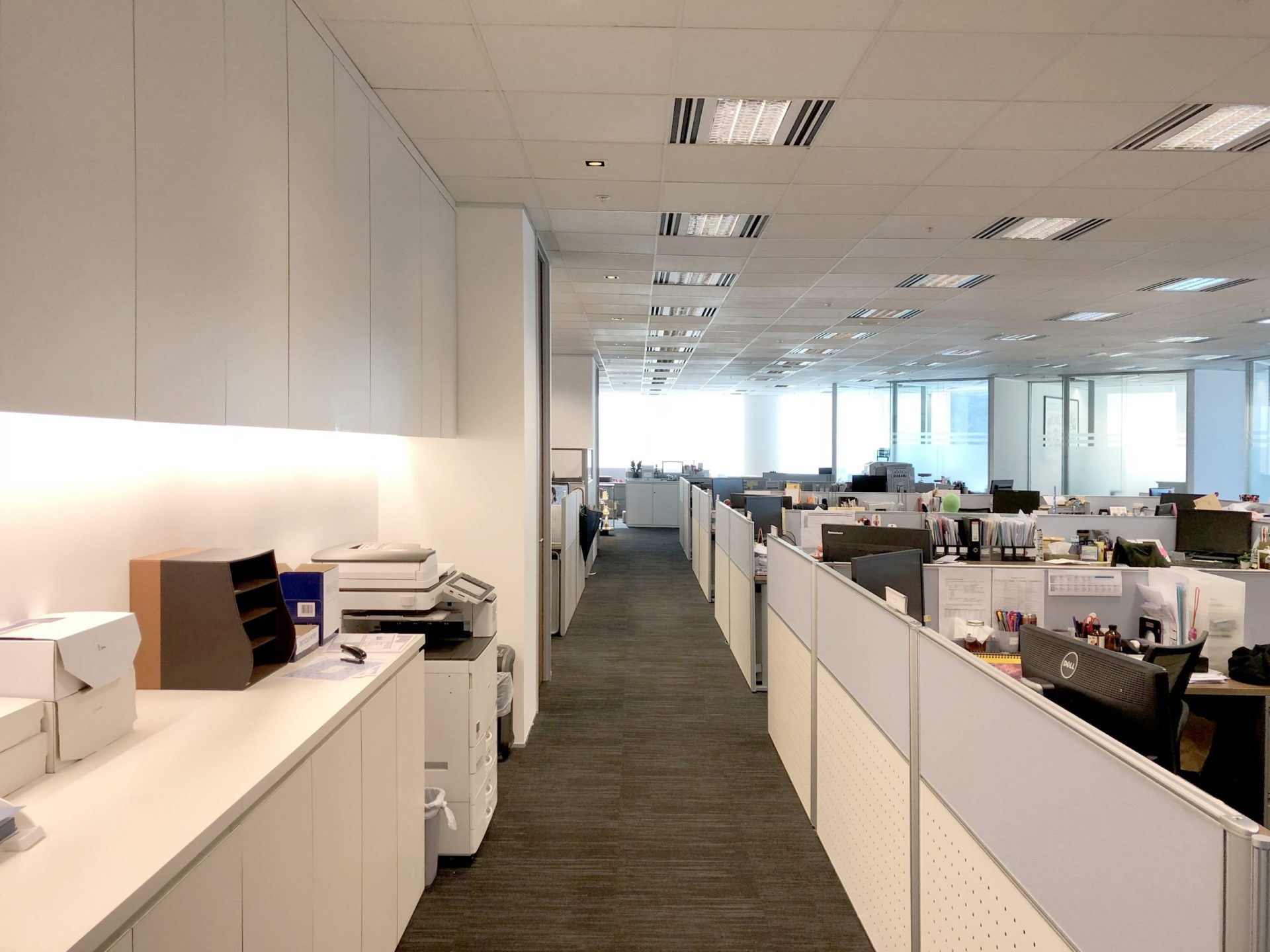
Step 2: Are there fans, AC vents, curtains, or plants in the detection zone?
Reposition sensor to avoid aiming at moving objects. For unavoidable cases, use dual-tech models (EDQ201).
Step 3: How close is the nearest WiFi router?
Maintain >= 2m distance between sensor and WiFi AP, especially for 5.8GHz models.
Key Installation Parameters (from field experience):
EasyDetek's EDQ201 combines Passive Infrared (PIR) with 24GHz radar for dual verification. Both sensing signals are used together before triggering an output.
Verification Logic: Radar detects movement -> PIR checks for body heat signature change -> trigger output when both signals match the target condition. If only one signal passes, the system can filter many wind-object or non-human movement cases.
For customers, sales engineers, and technical support, the first step is usually to identify the scene factor before replacing hardware.
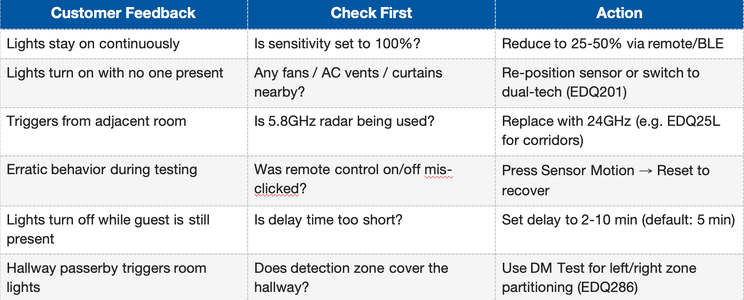
If the issue continues during testing, send installation-site photos or a short video. EasyDetek can provide remote diagnosis and suggest parameter, model, or installation adjustments.
With over 100 million sensors shipped and deployments in hotels, offices, and smart homes worldwide, EasyDetek treats false-trigger prevention as a design and deployment topic from the beginning of each project.
Not sure which model fits your site?
Share your application scenario before sampling.
You do not need to complete every item perfectly. The more context you provide, the easier it is for EasyDetek to recommend the right model and reduce avoidable test iterations.
--- EASYDETEK MODEL SELECTION FORM ---

1. Application Scenario: ______________________________

2. Mounting Location: ______________________________

3. Detection Purpose: ______________________________

4. Detection Area Size: ______________________________

5. Output Type Required: ______________________________

6. Communication Protocol: ______________________________

7. Available Input Voltage: ______________________________

8. System Integration (if any): ______________________________

9. Large Metal Surfaces Nearby? [ ] Yes  [ ] No  [ ] Not sure

10. WiFi Router Proximity?       [ ] < 2m  [ ] >= 2m  [ ] Not sure

11. Moving Objects in Zone?
    [ ] Curtains  [ ] Ceiling fan  [ ] AC vent  [ ] None

12. Wall/Partition Material?
    [ ] Concrete  [ ] Glass  [ ] Drywall  [ ] Open space

Additional Notes: ______________________________________

Estimated Quantity: ___________
Target Timeline: ___________
Providing this information before sampling helps EasyDetek recommend a more suitable model and reduce unnecessary back-and-forth during testing.
Return

Official Information Hotline: +852 8400 2558
Website: https://www.easydetek.com/en/Email: info@easydetek.com
Shenzhen EasyDetek Technology Co. Ltd ,
4th Floor, Building 3, Park A,
Xin'an COFCO Industrial Park, Bao'an District, Shenzhen